
A stock screener filters thousands of listed companies down to a short list that matches your criteria, such as market cap, valuation, dividend yield or price momentum. The best stock screener for you depends on what you screen for and on which markets you invest in.
In short, Interactive Brokers has screeners built into its trading platforms, for investors who want to screen and trade in the same place, Koyfin suits investors who screen on fundamentals across global stocks and TradingView is the best free stock screener for most investors because it covers global markets. Finviz is the fastest free option for US stocks, Stock Analysis also suits investors who screen on fundamentals and Trade Ideas is built for day traders. Every price and limit below comes from the provider's own website.
Best stock screeners
These are our picks for 2026 and what each one does best. The list is a selection by use case, not a strict ranking:
- Interactive Brokers: best screener built into a broker, for investors who want to screen and trade in the same place.
- Koyfin: best for deep data on global stocks.
- TradingView: best free stock screener, with global coverage and charts.
- Finviz: best free stock screener for US stocks.
- Stock Analysis: best low-cost screener for fundamentals.
- Simply Wall St: best stock screener for beginners.
- Seeking Alpha: best for screening US stocks by quant ratings.
- Zacks: best for ready-made screens built on the Zacks Rank.
- Trade Ideas: best stock screener for day trading.
Comparison of the best stock screeners
| Screener | Paid from | Free plan | Best for |
| Interactive Brokers | No separate plan (IBKR account needed) | Part of IBKR's platforms | Screening and trading in one place |
| Koyfin | $39 a month (Plus) | Yes (2 screens, stocks only) | Deep data on global stocks |
| TradingView | $12.95 a month (billed annually) | Yes (1 saved screen) | Free global screening with charts |
| Finviz | $39.50 a month or $299.50 a year (Elite) | Yes (50 saved presets, delayed quotes) | Fast screens of US stocks |
| Stock Analysis | $9.99 a month or $79 a year (Pro) | Yes (339 indicators and metrics) | Fundamentals on a budget |
| Simply Wall St | Annual plans only (Premium and Unlimited) | Yes (top 4 results per screen) | Beginners who prefer visual screens |
| Seeking Alpha | $299 a year (Premium) | No (the screener needs Premium) | US stocks by quant ratings |
| Zacks | $249 a year (Premium) | Yes (custom and predefined screens) | Ready-made screens on the Zacks Rank |
| Trade Ideas | $127 a month or $1,068 a year (TI Standard) | Yes (15-minute delayed data) | Real-time scans for day trading |
Source: each provider's own pricing page, 26 November 2026. Regular prices in US dollars, before sales tax or VAT where applicable and without the Black Friday discounts several providers were running.
Stock screener reviews
Interactive Brokers: best screener built into a broker
Interactive Brokers (IBKR) builds screeners into its own platforms. In Client Portal, the Market Screener in the Research menu lets you pick a product type and region (for example US stocks or Europe stocks), an exchange such as the London Stock Exchange and a scan type such as top percentage gainers, then narrow the results by price and volume and save them as a watchlist.
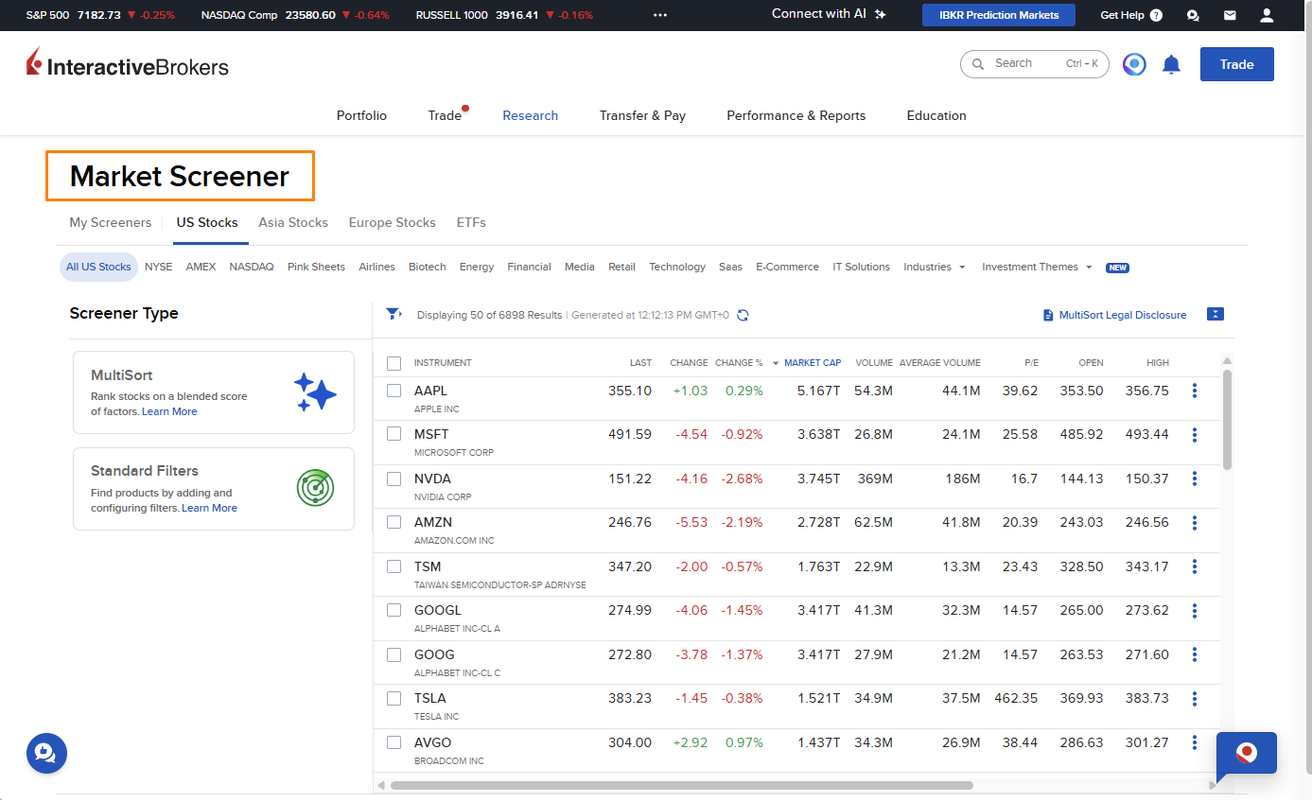
The Market Screener in the Client Portal. Screenshot from our own Interactive Brokers account, 26 November 2026.
Trader Workstation (TWS), its desktop platform, adds the Mosaic Market Scanners, with a library of predefined scans that you can filter by region and asset class, and the Advanced Market Scanner, which scans more assets with more filters. Mosaic results can be exported to Excel.
- Best for: investors who want to screen US, UK and European stocks and trade them in the same account.
- Cost: the scanners are part of IBKR's trading platforms, so you need an IBKR account to use them.
- Drawbacks: according to IBKR, a Mosaic scan returns up to 50 results, and TWS takes longer to learn than a web screener.
Want to know more about the broker? Check our Interactive Brokers review.
Disclaimer: investing involves risk of loss.
Koyfin: best for deep data on global stocks
Koyfin has a screener that covers over 100,000 global equities with more than 5,900 filter criteria, from region and sector to financials, growth rates, analyst ratings and estimate revisions. You can start from pre-built templates, save the results to a watchlist or download them as a CSV file.
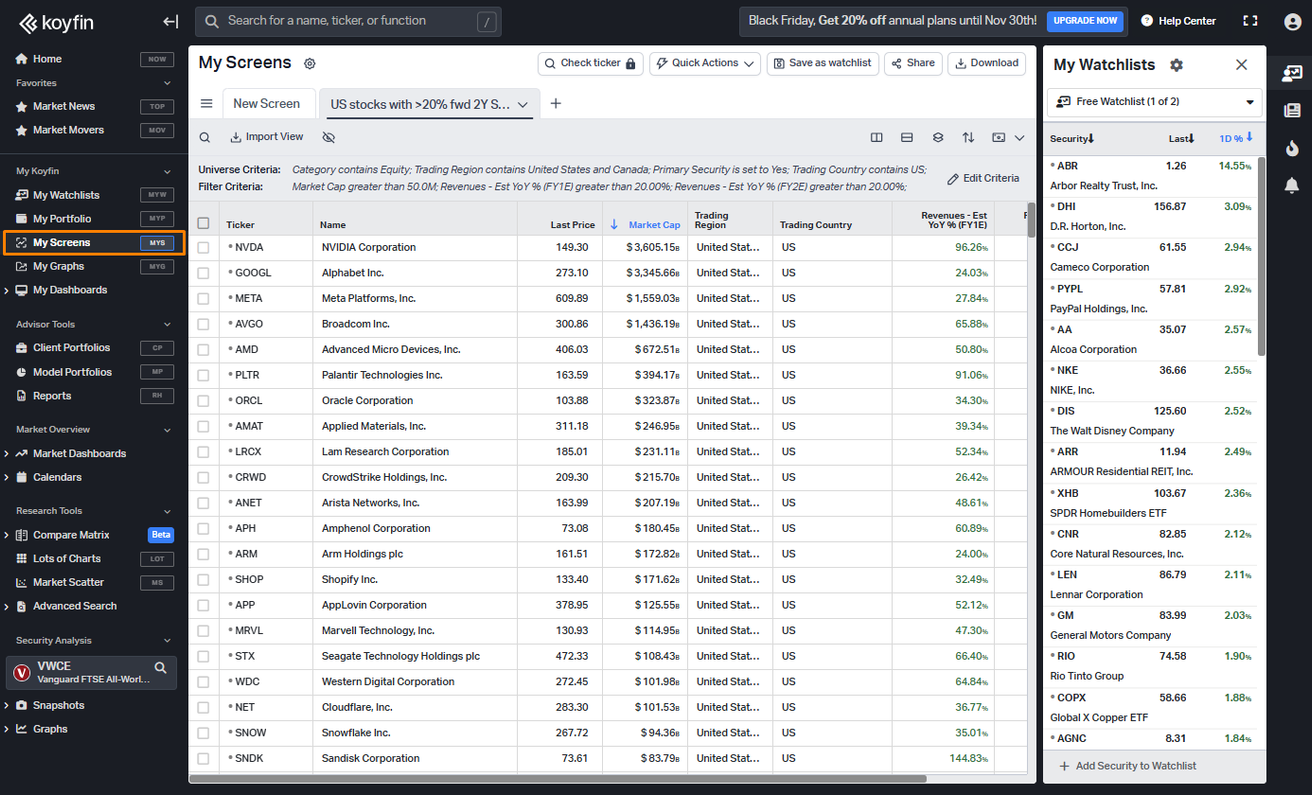
A saved screen in My Screens. Screenshot from our own Koyfin account, 26 November 2026.
- Best for: investors who want terminal-style depth across US, European and other markets.
- Free plan: stock screener only, with 2 screens, 2 watchlists, 2 custom dashboards, 2 years of financials and 1 year of estimates.
- Paid plans: Plus costs $39 a month and adds unlimited screens and watchlists, the ETF screener, 10 years of financials and estimates and Check Ticker, which shows why a security passes or fails each criterion. Premium costs $79 a month. Koyfin says annual plans save up to 30% and offers a full refund within 30 days.
- Drawbacks: the free plan stops at 2 screens and has no ETF screening, and mutual fund screening is reserved for the Advisor plans, from $209 a month.
TradingView: best free stock screener
TradingView's stock screener is free to use and covers stock markets around the world. It opens on your local market and you can switch to another country or screen two or more regions at once. Filters are grouped into eight categories (security info, market data, technicals, financials, dividends, valuation, growth, and margins and ratios), so it works for technical and fundamental screens alike.
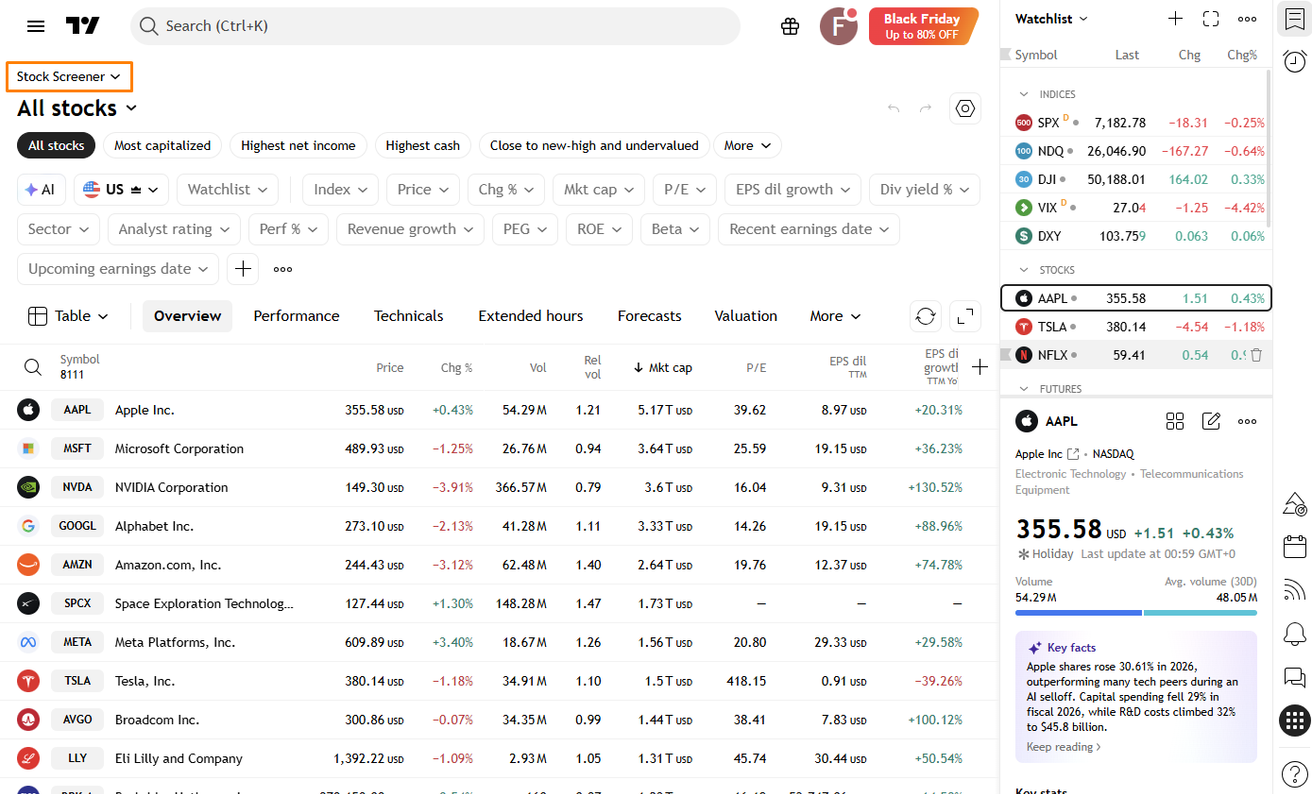
The Stock Screener with its filter bar. Screenshot from our own TradingView account, 26 November 2026.
Results can be shown as a table or as a grid of charts, saved as custom screens and exported as a CSV file. TradingView also has separate screeners for ETFs, bonds and crypto. If you are looking for other charting platforms, see our list of TradingView alternatives.
- Best for: investors and traders who want one free screener for US, UK, European and other markets.
- Free plan: the Basic plan includes the stock screener with 1 saved screen and daily, weekly and monthly timeframes.
- Paid plans: billed annually, Essential costs $12.95 a month, Plus $29.95, Premium $59.95 and Ultimate $199.95. They add all timeframes, screener auto-refresh and the Pine Screener.
- Drawbacks: the free plan shows ads, and refunds are only available for annual plans within 14 days of payment.
We list every limit of the Basic plan in our guide Is TradingView free? and you can test the ideas a screen gives you with TradingView paper trading.
Finviz: best free stock screener for US stocks
Finviz is a US-only screener. It covers the stocks listed on NASDAQ, NYSE and AMEX, and Finviz says it has no current plans to add other markets. Descriptive, fundamental and technical filters sit on a single page, next to 15 ready-made signals such as top gainers, new highs, unusual volume and oversold stocks, which makes it quick to go from an idea to a list.
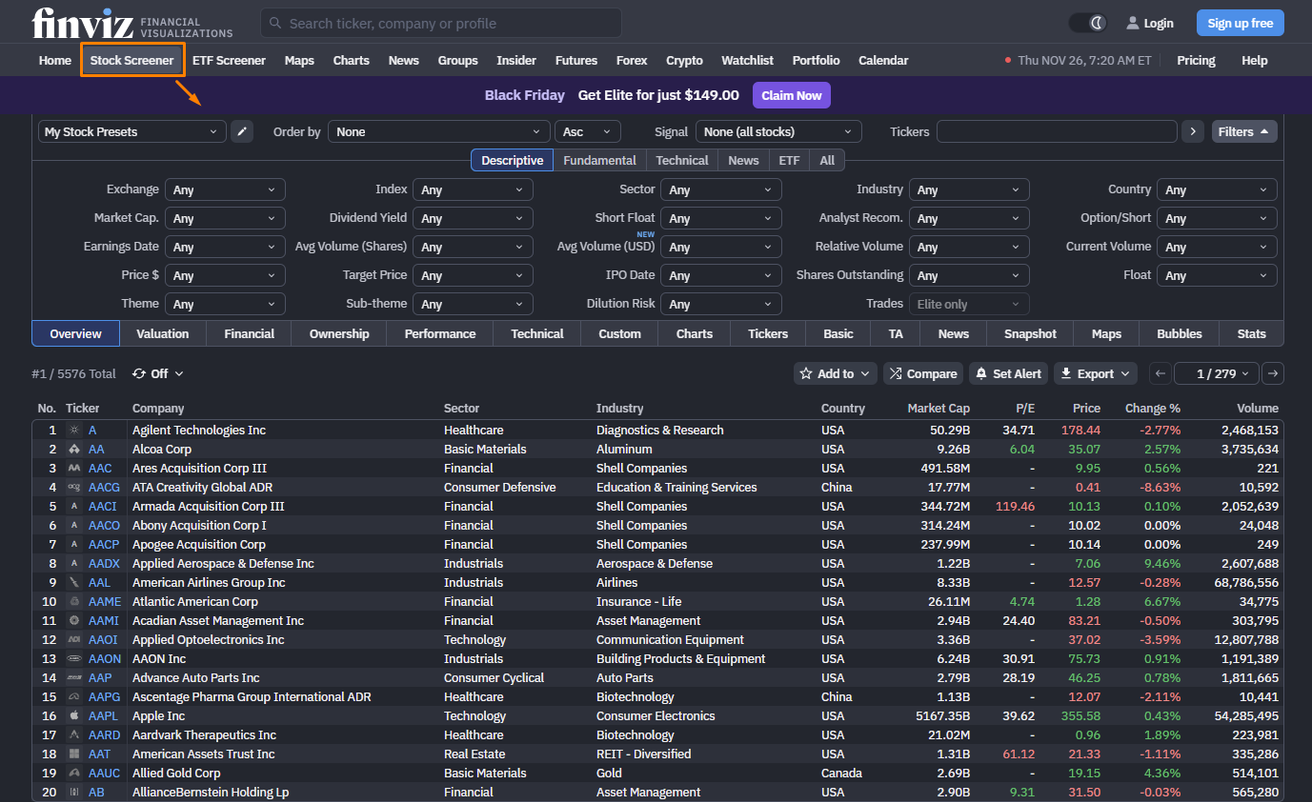
The Stock Screener with the descriptive filters. Screenshot from Finviz's website, 26 November 2026.
- Best for: quick screens of US stocks without paying.
- Free plan: with a free registered account you get basic filters, 50 saved presets, 20 rows per page and 3 years of financial statements. Stock quotes are delayed by 1 minute, the screener refreshes every 3 minutes, and there are no alerts and no export to Excel or CSV.
- Paid plan: Finviz Elite costs $39.50 a month or $299.50 a year. It adds real-time quotes including pre-market and after-hours, advanced filters, unlimited presets, 100 rows per page, a 10-second refresh, alerts, exports and 10 years of financial statements. Refunds are available in the first 30 days.
- Drawbacks: no stocks outside US exchanges, and the free version has ads and delayed quotes.
Stock Analysis: best low-cost screener for fundamentals
Stock Analysis offers a free stock screener with 339 indicators and metrics, with data updated once per minute. When we checked, it listed 5,598 US stocks, and a country selector opens up stocks on 119 exchanges, including the London Stock Exchange, Euronext and Xetra. There are separate screeners for ETFs and IPOs.
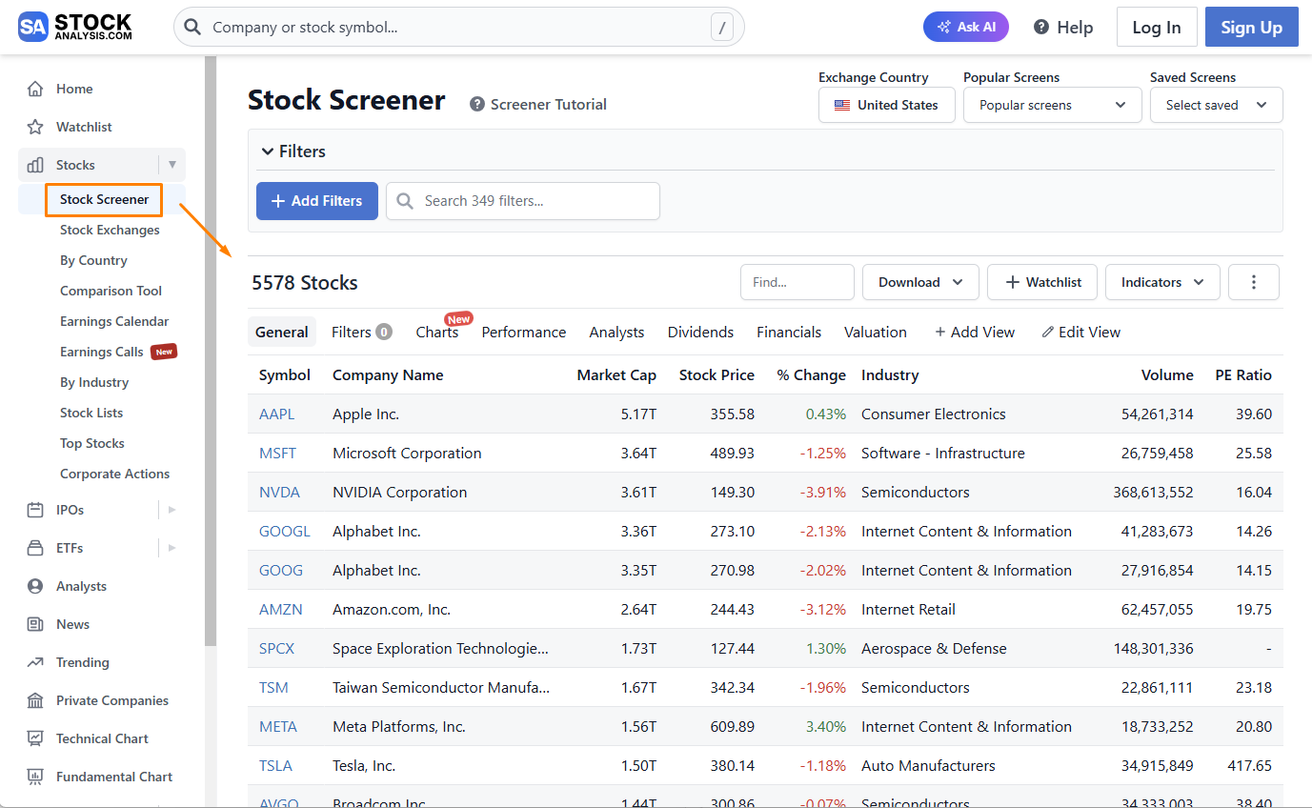
The Stock Screener with the exchange country selector. Screenshot from Stock Analysis' website, 26 November 2026.
- Best for: investors who screen on fundamentals and want to pay little or nothing.
- Free plan: $0 with no payment details required.
- Paid plans: Pro costs $9.99 a month or $79 a year and lists saved stock screeners, up to 1,000 table rows, 1 download a day to Excel, CSV or Google Sheets, 10 to 40 years of financial history and no ads. Unlimited costs $29 a month or $199 a year and removes the download limit. Both come with a 60-day money-back guarantee.
- Drawbacks: saved screeners and downloads are listed as Pro features, so the free version suits one-off screens more than a routine you repeat every week.
Simply Wall St: best stock screener for beginners
Simply Wall St covers more than 120,000 stocks across 90+ markets and summarises each company in a Snowflake, its visual score. In the screener you drag the Snowflake to the shape you are looking for, then narrow the list by market, industry and metrics such as P/E, PEG, ROE, dividend yield, returns and insider ownership.
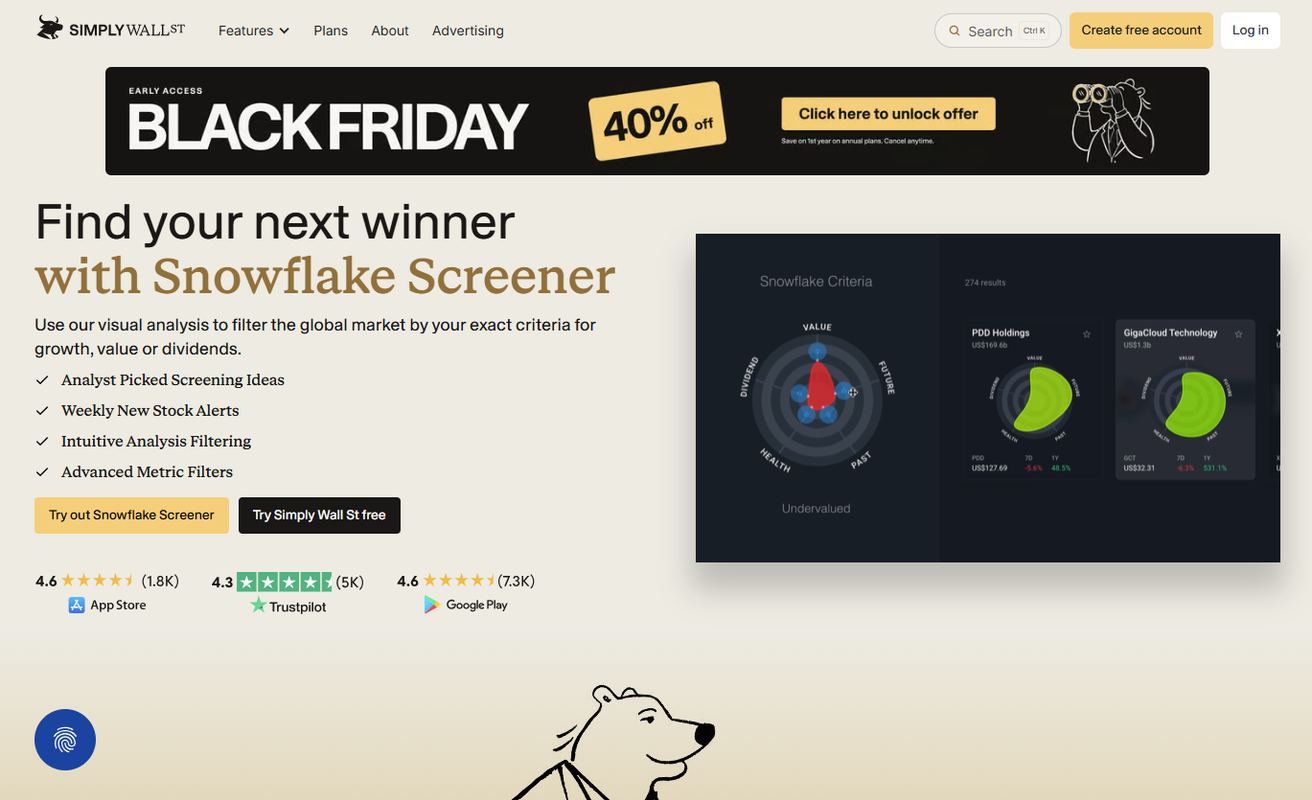
The Snowflake Screener page. Screenshot from Simply Wall St's website, 26 November 2026.
A keyword filter (in beta) finds themes such as artificial intelligence, Popular Screens apply a curated set of filters in one click, and a saved screener sends weekly notifications when new companies match it.
- Best for: beginners and long-term investors who prefer visuals to tables of ratios.
- Free plan: shows the top 4 results of each screen and 5 company reports a month. New accounts get 7 days of Premium with no credit card required.
- Paid plans: Premium and Unlimited show the full results of a screen. Simply Wall St only sells annual subscriptions, with a 14-day money-back guarantee for new subscribers, and shows the price on its plans page.
- Drawbacks: 4 results per screen is too little to rely on the free plan for screening, and there is no monthly billing.
Seeking Alpha: best for screening US stocks by quant ratings
Seeking Alpha's stock screener is a Premium feature. It screens on about 100 criteria, including its Quant ratings, dividend grades and five factor grades (Value, Growth, Profitability, Momentum and EPS Revisions), each graded from A+ to F and updated once a day before the market opens. Screens can be saved under a name of your choice.
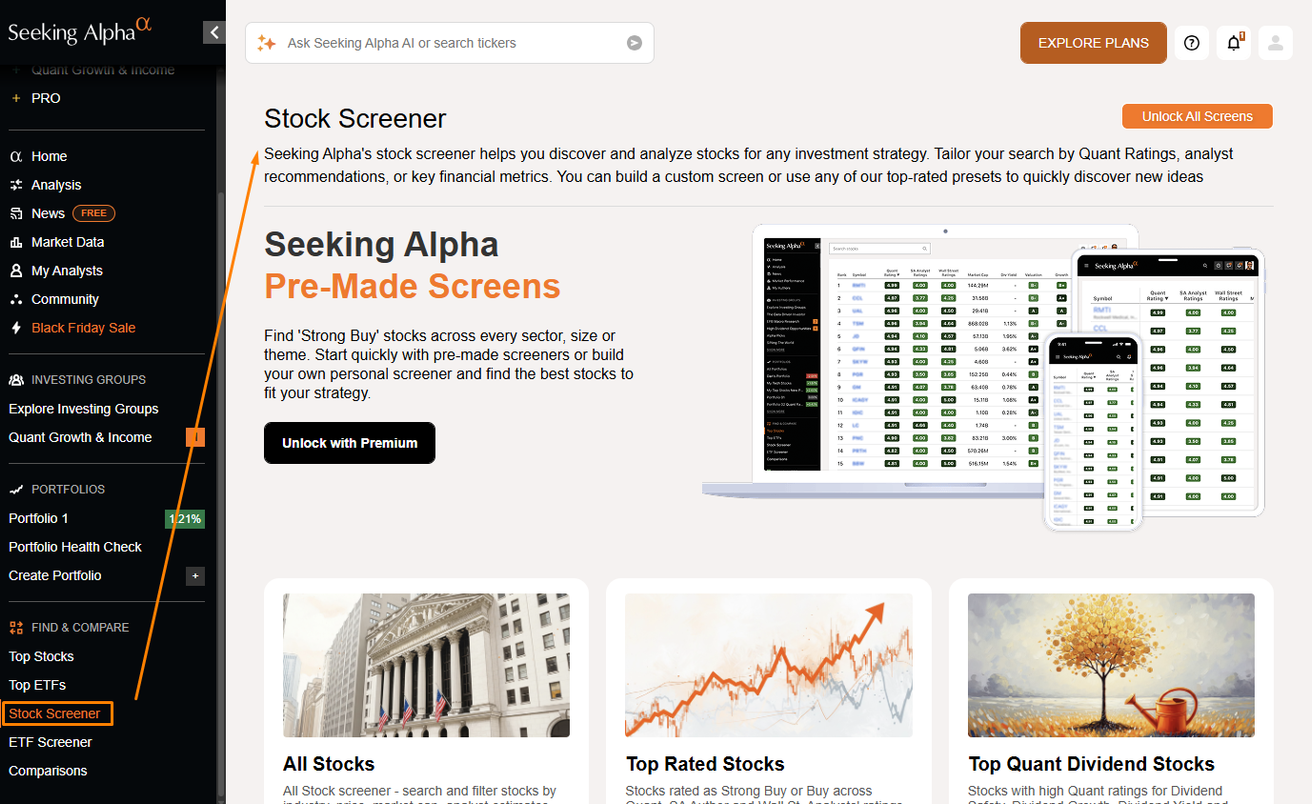
The Stock Screener page on a free account. Screenshot from our own Seeking Alpha account, 26 November 2026.
The Quant ratings cover about 5,600 stocks. They include ADRs (American Depositary Receipts, the US-listed shares of foreign companies) but not stocks trading on foreign exchanges, and they leave out stocks without sell-side analyst coverage.
- Best for: investors in US-listed stocks who want to filter by ratings instead of building every screen from raw ratios.
- Free plan: the Basic plan does not include the stock screener.
- Paid plan: Premium costs $299 a year, plus taxes and VAT where applicable.
- Drawbacks: no free screener and no coverage of stocks listed only in London, Frankfurt or other non-US exchanges.
Zacks: best for ready-made screens
Zacks has a free stock screener where you choose your own criteria or start from predefined screens, plus thematic screens that cover 37 investment themes. The paid service, Zacks Premium, adds 50 premium screens in nine categories (value, growth, momentum, VGM, income, market cap, price target, bearish and bonus screens), many of them filtered on the Zacks Rank and the Zacks Style Scores.
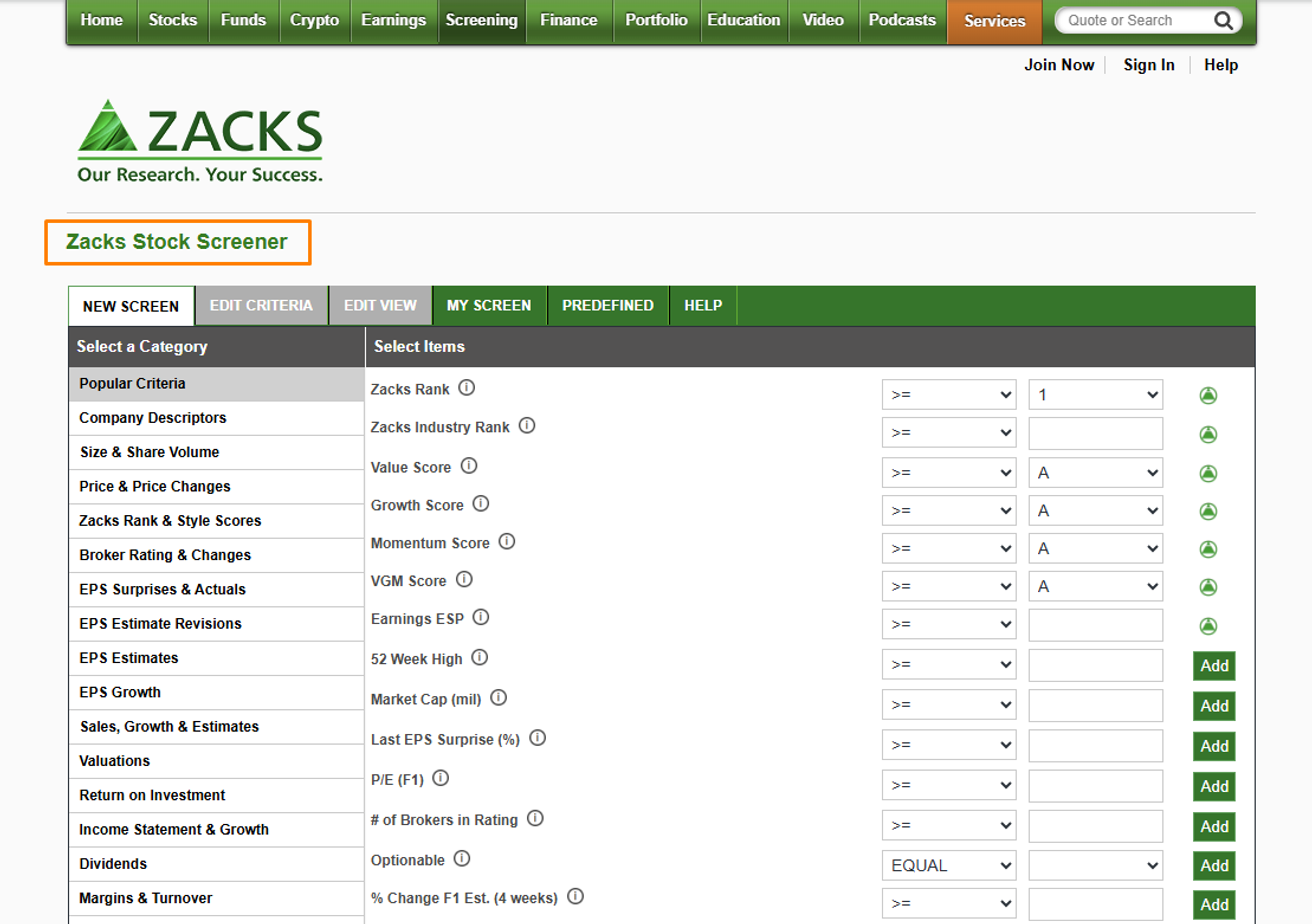
The Stock Screener with its criteria categories. Screenshot from Zacks' website, 26 November 2026.
Premium also opens the Zacks #1 Rank List, which Zacks describes as the top 5% of stocks with the most potential, and the Focus List, a portfolio of 50 long-term stocks.
- Best for: investors who would rather start from a tested list of screens than set every filter themselves.
- Free plan: the custom screener, basic screens and a portfolio tracker that shows the Zacks Rank and Style Scores of your stocks.
- Paid plan: Zacks Premium costs $249 a year. It starts with a free trial and has a satisfaction guarantee.
- Drawbacks: the Zacks #1 Rank List and the premium screens, which are the main reason to choose Zacks, sit behind the subscription.
Trade Ideas: best stock screener for day trading
Trade Ideas is a real-time scanner more than a classic screener. Its streaming alerts fire on every trade as it prints, and its Top Lists rank the market by your filters and refresh every 15 seconds. The library holds 310 stock alerts and 249 screener filters, grouped into categories such as gaps, momentum, volume, highs and lows and candlestick patterns.
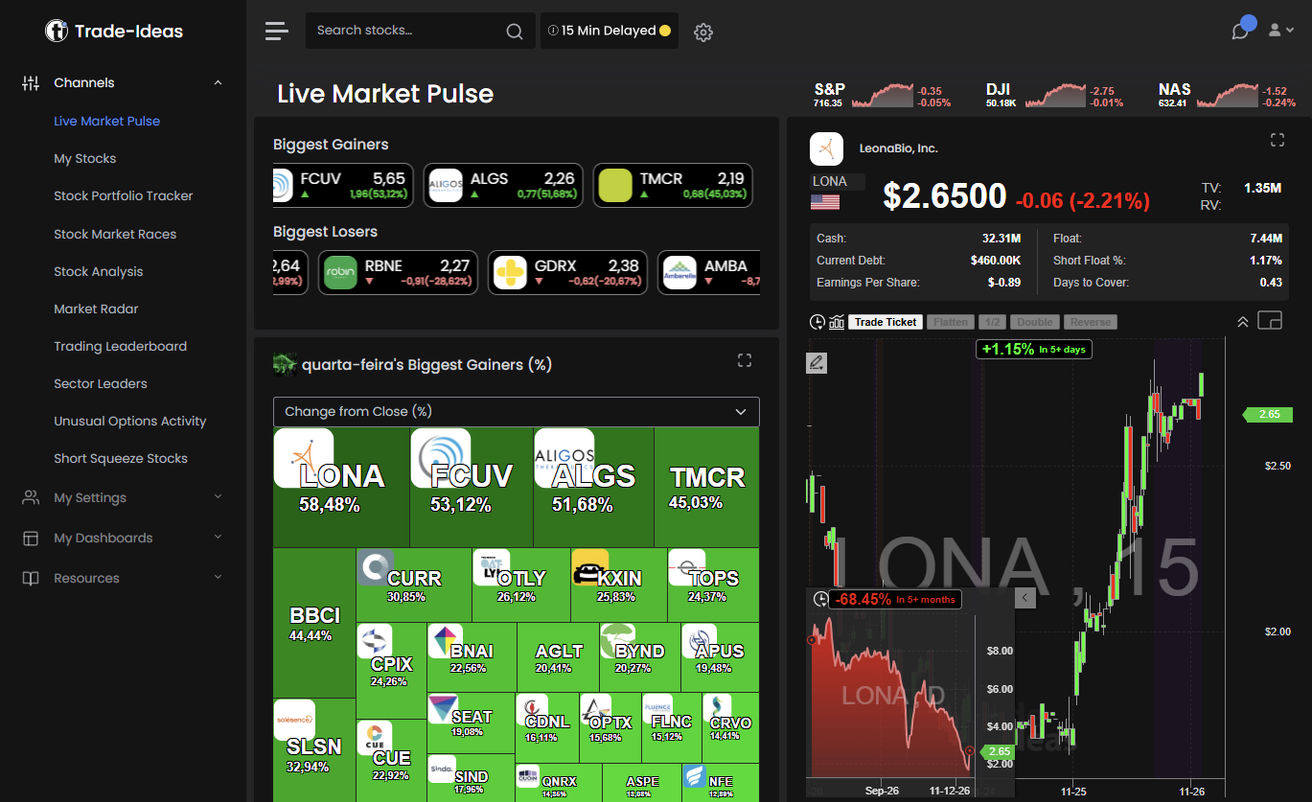
The Live Market Pulse dashboard with 15-minute delayed data. Screenshot from our own Trade Ideas account, 26 November 2026.
Paid plans cover US stocks on NYSE, NASDAQ, AMEX and OTC markets, with pre-market data from 4:00 am ET and after-hours data until 8:00 pm ET, plus limited coverage of the Toronto Stock Exchange (TSX).
- Best for: day traders who need to see US stocks moving as it happens.
- Free plan: a free account, opened with an email and no card, gives access to the web dashboard with pre-built scans and heat maps on 15-minute delayed data.
- Paid plans: TI Standard costs $127 a month or $1,068 a year and includes real-time streaming alerts, custom scans, 10 charts and paper trading. TI Premium costs $254 a month or $2,136 a year and adds the Holly AI buy and sell signals and OddsMaker backtesting.
- Drawbacks: the highest price on this list, and the TI Pro desktop app runs on Windows (Mac users need Parallels).
A scanner only finds the trade. To place it, see our comparison of the best day trading platforms in the US.
Best free stock screeners
Seven of the nine picks can be used without paying for a subscription. What changes is where each free plan stops:
- Interactive Brokers: the scanners come with its trading platforms, so you only need an IBKR account.
- Koyfin: global stocks with 2 screens and 2 years of financials.
- TradingView: global stock screener with 1 saved screen, with ads.
- Finviz: US stocks, 50 saved presets and 20 rows per page, with quotes delayed by 1 minute and no export.
- Stock Analysis: 339 indicators and metrics, with saved screeners and downloads on the Pro plan.
- Zacks: custom and basic screens, without the premium screens.
- Trade Ideas: pre-built scans on 15-minute delayed data.
Simply Wall St also has a free plan, but it only shows the top 4 results of each screen. Outside our list, Yahoo Finance lets you create and save screeners for stocks, mutual funds and ETFs with dozens of filters.
Best stock screeners for day trading
For day trading, the data delay matters more than the number of filters. A screen that refreshes every 3 minutes on delayed quotes is fine for building a watchlist the evening before, but not for trading the open.
- Interactive Brokers is the only broker on this list, so you can run a scan such as top percentage gainers and place the trade in the same account.
- Trade Ideas is the specialist, with alerts on every trade and pre-market data from 4:00 am ET on its paid plans.
- Finviz Elite adds real-time quotes, pre-market and after-hours data and a 10-second screener refresh for $39.50 a month.
- TradingView paid plans add screener auto-refresh and all timeframes, from $12.95 a month billed annually.
Best stock screeners for UK and European stocks
Many rankings are written for US investors and several popular screeners only cover US exchanges. If you invest in UK or European shares, check coverage first:
- Interactive Brokers: scans by region and exchange, such as Europe stocks or the London Stock Exchange.
- Koyfin: over 100,000 global equities, with region as a filter.
- TradingView: lets you select markets by country and screen several regions at once, in base currencies such as EUR and GBP.
- Stock Analysis: lists 119 exchanges, including the London Stock Exchange (3,593 stocks, plus 599 on AIM), Deutsche Börse Xetra (1,326) and Euronext Paris (718).
- Simply Wall St: 90+ markets, including the UK and Germany.
Finviz (NASDAQ, NYSE and AMEX only), Seeking Alpha's Quant ratings (no stocks on foreign exchanges) and Trade Ideas (US stocks, with limited TSX coverage) are only available for North American listings. All nine providers quote their prices in US dollars, and VAT may be added at checkout for buyers in the UK and the EU.
Free vs paid stock screeners: is it worth paying?
A free screener is enough if you run a handful of screens a month to find companies to research. Free plans usually already include the filters. What a subscription adds is real-time data, more saved screens, alerts, exports and longer financial history.
Paying makes sense in three cases: you trade intraday and need real-time quotes (Finviz Elite, Trade Ideas, TradingView), you repeat the same screens every week and want them saved with alerts or exported to a spreadsheet (Stock Analysis Pro at $79 a year is the lowest price on this list), or you want a provider's own ratings, such as Seeking Alpha's Quant ratings or the Zacks Rank lists.
Before subscribing, compare the refund terms: 60 days at Stock Analysis, 30 days at Finviz and Koyfin, 14 days at Simply Wall St and 14 days at TradingView for annual plans only.
How to choose a stock screener
- Markets covered: start here if you invest outside the US, because a screener that does not list your market is of no use, however many filters it has.
- Type of filters: long-term investors need fundamentals such as valuation, growth, margins and dividends, while traders need technicals such as volume, gaps and moving averages. If you screen for dividend stocks, our dividend calculator shows what a given yield could pay over time.
- Data delay: delayed quotes are fine for fundamental screens and a problem for intraday scans.
- Saved screens, alerts and exports: these are the features most often kept for paid plans, so check the limits of the free plan before building a routine around it.
- Ratings or raw data: scores such as the Snowflake, the Quant ratings or the Zacks Rank save time, but they are the provider's model and not a guarantee of future returns.
- Price and billing: compare the monthly and annual price, whether there is a free plan or only a trial, and the refund window.
A screener gives you a list of candidates, not a decision. Each company on the list still needs research, which is where tools such as Fiscal.ai, covered in our Fiscal.ai review, come in.
How we chose these stock screeners
We kept the list to nine screeners that each serve a different type of investor, instead of listing every tool on the market. The list is a selection by use case, so the order of the picks is not a ranking from best to worst. For each one we read the provider's own pricing, feature and help pages on 26 November 2026 and compared the markets covered, what the free plan includes, the monthly and annual price, the filters that set it apart and the drawbacks. Where a provider did not publish a figure, we left it out.
Bottom line
Interactive Brokers lets you screen and trade in one account and Koyfin goes deeper on fundamentals. For most investors, the best stock screener is a free one: TradingView if you invest in more than one country and Finviz if you only buy US stocks. Stock Analysis also goes deeper on fundamentals, Simply Wall St is the easiest to read, Seeking Alpha and Zacks add their own ratings and Trade Ideas is the choice for day traders.
Disclaimer: When investing, your capital is at risk and you may get back less than invested. This article is for information only and is not tax or investment advice.
FAQs
What is the best stock screener?
It depends on your markets and style. Interactive Brokers suits investors who want to screen and trade in the same account, Koyfin and Stock Analysis suit fundamental investors and TradingView's free screener covers global markets with technical and fundamental filters. Finviz is the quickest for US stocks and Trade Ideas suits day traders.
What is the best free stock screener?
TradingView for global markets and Finviz for US stocks. Stock Analysis is a good free option for fundamentals, with 339 indicators and metrics, and Koyfin's free plan allows 2 screens on global stocks.
What is the best stock screener for day trading?
Trade Ideas, because its alerts stream in real time on every trade and its paid plans include pre-market data from 4:00 am ET. It costs from $127 a month. Finviz Elite, at $39.50 a month, is a cheaper way to get real-time quotes and a 10-second screener refresh.
Is Finviz or TradingView better?
Finviz is quicker for screening US stocks and allows 50 saved presets for free, but it only covers NASDAQ, NYSE and AMEX. TradingView covers markets worldwide and combines the screener with its charts, with 1 saved screen on the free plan. Investors outside the US are better served by TradingView.
Which stock screener covers UK and European stocks?
The Interactive Brokers scanners, Koyfin, TradingView, Stock Analysis and Simply Wall St all cover UK and European exchanges. Finviz, Trade Ideas and Seeking Alpha's Quant ratings do not cover stocks listed only on European exchanges.
What is the best stock screener app?
Among our picks, TradingView has apps for iOS and Android. If you already invest through a broker, check the screener in its platform first, as Interactive Brokers includes one with its account.
Is a paid stock screener worth it?
Only if you need what free plans leave out: real-time data for intraday trading, saved screens with alerts, exports or a provider's own ratings. For occasional screens to find companies to research, a free screener is enough.