
Yes, TradingView is free to use. The free plan is called Basic, it has no time limit and it includes the charts, the screeners and paper trading. Paid plans start at $12.95 a month when billed annually and remove the limits on indicators, charts, alerts and data. If the Basic plan falls short, our list of TradingView alternatives compares nine other charting tools, several of them free.
This guide shows what you get for free, where the free plan stops and what each paid plan costs. The figures come from TradingView's pricing page.
TradingView plans and prices
| Plan | Billed monthly | Billed annually |
| Basic | $0 | $0 |
| Essential | $14.95 a month | $12.95 a month ($155.40 a year) |
| Plus | $34.95 a month | $29.95 a month ($359.40 a year) |
| Premium | $69.95 a month | $59.95 a month ($719.40 a year) |
| Ultimate | $239.95 a month | $199.95 a month |
Source: TradingView pricing page, 23 November 2026, during its Black Friday sale. Sales tax may be added depending on your country.
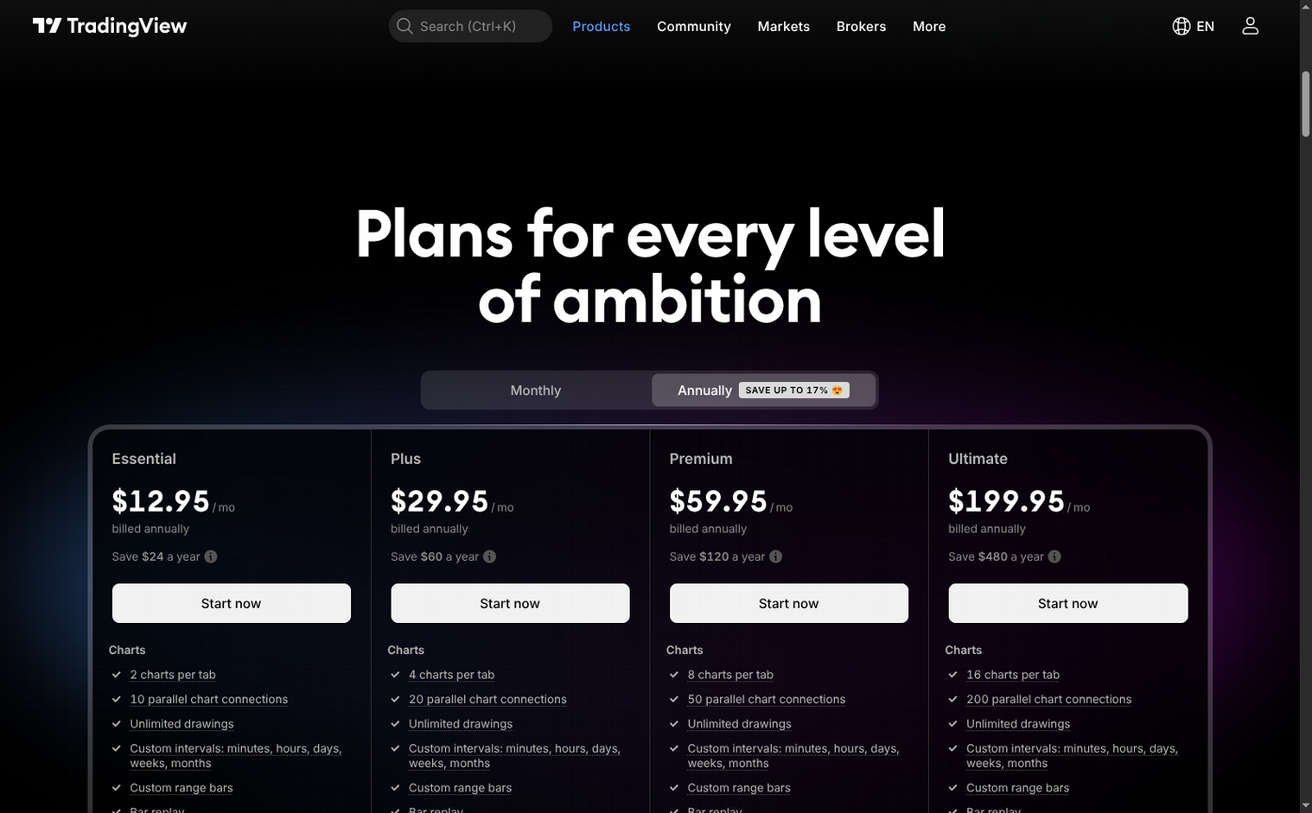
TradingView's paid plans, billed annually. Screenshot from TradingView's pricing page, 23 November 2026.
Annual billing costs up to 17% less than paying month by month. Professional users can only subscribe to the Ultimate plan.
What does the free TradingView plan include?
The Basic plan needs only a free TradingView account, and the account settings label it "Forever free".
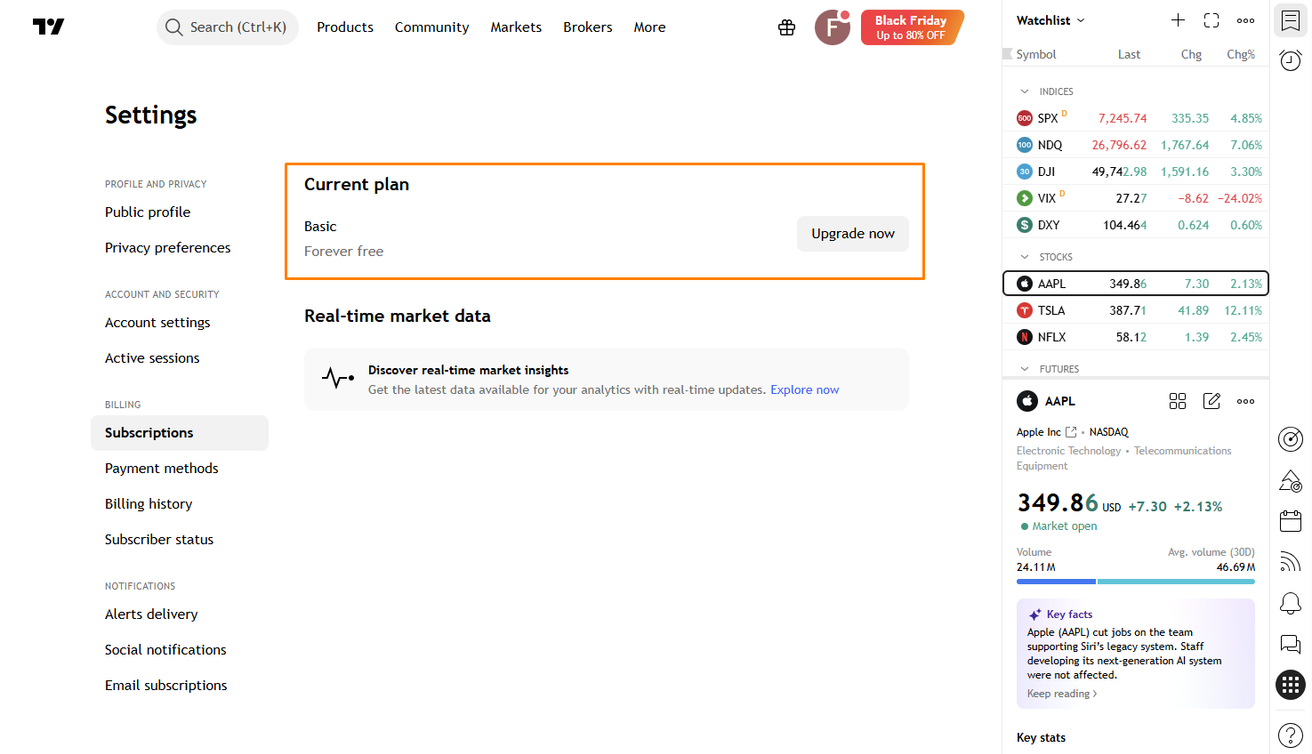
The Basic plan in the account settings. Screenshot from our own TradingView account, 23 November 2026.
- Charts: 1 chart per tab with 5,000 historical bars and the standard timeframes.
- Indicators: 2 indicators per chart.
- Alerts: 3 price alerts.
- Watchlist: 1 watchlist with up to 30 symbols.
- Saved layouts: 1 saved chart layout.
- Bar Replay: on daily and higher timeframes.
- Paper trading: the simulator with virtual money is available to every user.
The stock screener also works on the Basic plan. In our account it listed more than 8,000 US stocks, with filters such as price, market cap and P/E. Our list of the best stock screeners compares it with eight other tools.
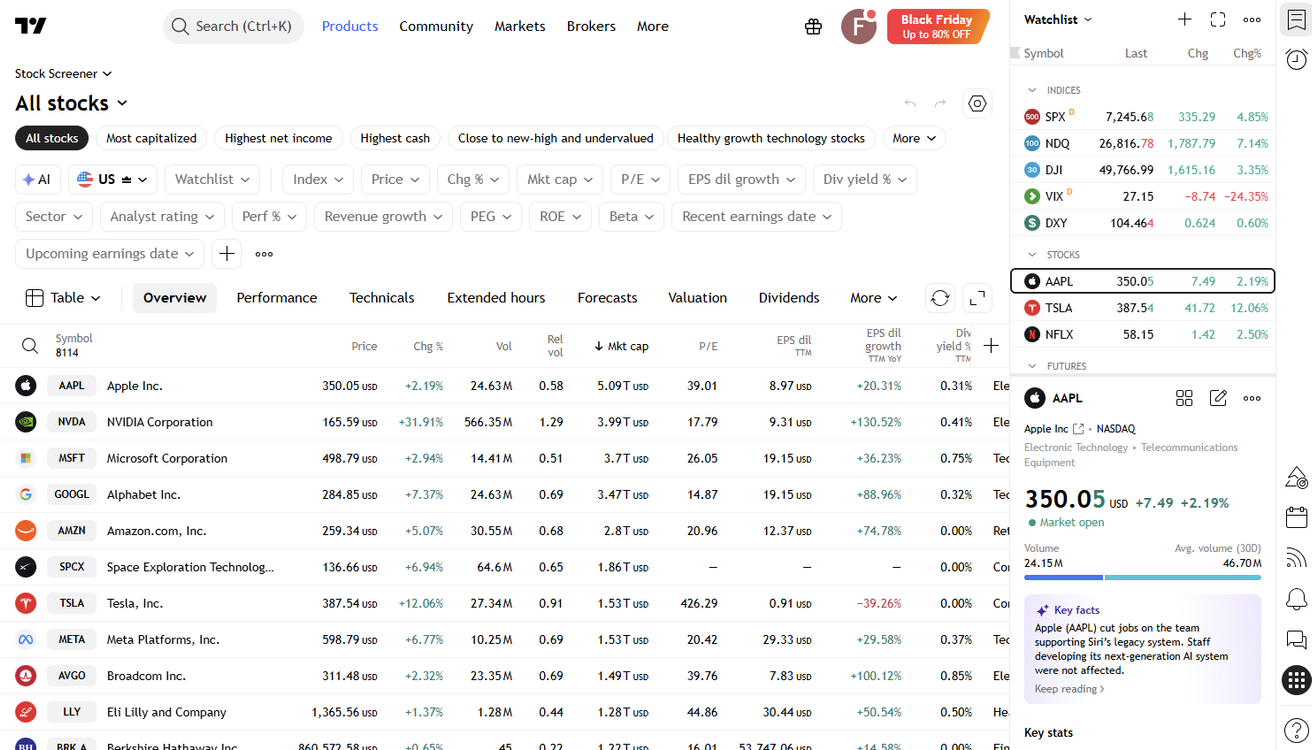
The stock screener on the Basic plan. Screenshot from our own TradingView account, 23 November 2026.
Where does the free plan stop?
The free plan is enough to follow prices and draw on a chart, but active traders reach its limits quickly.
- Ads: only paid plans remove them.
- Two indicators: a moving average and a volume indicator already use the full allowance.
- One chart per tab: you cannot compare several charts side by side.
- No technical alerts: alerts on indicators start with the Essential plan.
- No custom or second-based intervals: these, along with volume profile, intraday Bar Replay and chart data export, are listed only on paid plans.
- No real-time data add-ons: real-time feeds for exchanges such as NASDAQ, NYSE and CME are sold separately and require a paid plan or a trial.
When we tried to add a third indicator, TradingView showed the message below and suggested the Essential plan, which allows 5 indicators per chart.
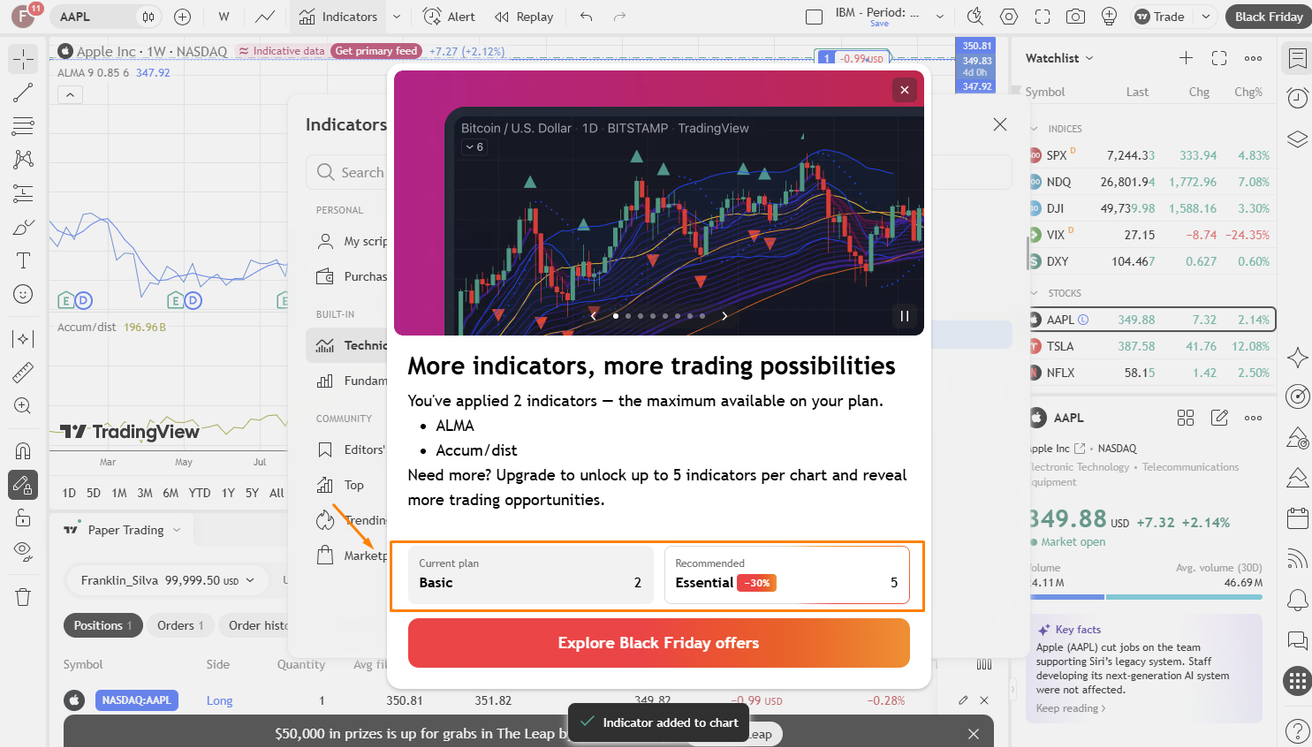
The 2-indicator limit on the Basic plan. Screenshot from our own TradingView account, 23 November 2026.
Free vs paid TradingView plans
| Feature | Basic | Essential | Plus | Premium |
| Charts per tab | 1 | 2 | 4 | 8 |
| Indicators per chart | 2 | 5 | 10 | 25 |
| Price alerts | 3 | 20 | 100 | 400 |
| Technical alerts | Not included | 20 | 100 | 400 |
| Historical bars | 5,000 | 10,000 | 10,000 | 20,000 |
| Real-time data subscriptions | Not available | Up to 2 | Up to 4 | Up to 6 |
| Ads | Yes | No | No | No |
Source: TradingView pricing page, November 2026.
The Ultimate plan goes further, with 16 charts per tab, 50 indicators per chart and 1,000 price alerts.
Is TradingView data free?
Partly. Crypto prices are in real time for everyone. US stocks are also shown in real time on the free plan, through the Cboe One exchange, so prices can differ slightly from the official NYSE or NASDAQ feed, and on the Basic plan they update once per second. Many other exchanges, including futures, show delayed data. The official real-time feeds are an extra monthly fee on top of a paid plan, and TradingView's market data page lists the US stock markets bundle at $9.95 a month.
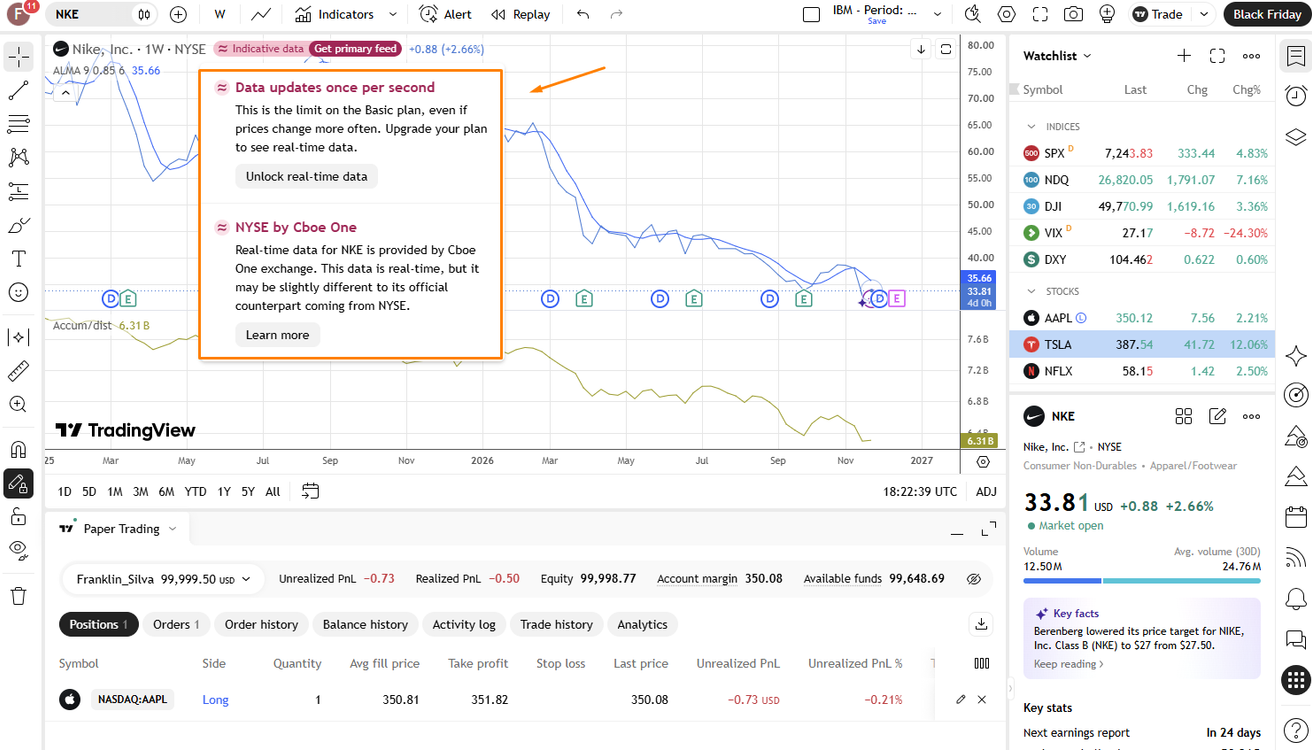
Data limits on the Basic plan. Screenshot from our own TradingView account, 23 November 2026.
If you trade through a broker connected to TradingView, the quotes in the order panel come from that broker.
Is TradingView paper trading free?
Yes. Paper trading works on the Basic plan and starts with $100,000 in virtual funds, as we show step by step in our guide to TradingView paper trading.
Is it worth paying for TradingView?
Stay on the free plan if you check charts a few times a week, use one or two indicators and invest for the long term.
Essential ($12.95 a month billed annually) makes sense if the ads bother you or you need 5 indicators, 2 charts per tab and alerts on indicators.
Plus or Premium are aimed at day traders who watch several charts at once and rely on many alerts.
Before you pay, two rules on the pricing page matter. Refunds are available only for annual plans, if you ask within 14 days of payment, and there are no refunds for monthly plans or market data. TradingView also runs sales, and the page advertised up to 80% off during its Black Friday sale.
Pros and cons of the free TradingView plan
Pros
- Free with no time limit
- Charts, screeners and paper trading included
- 1 watchlist and 1 saved chart layout
- Real-time crypto data
Cons
- Ads on the platform
- Only 2 indicators and 1 chart per tab
- Only 3 price alerts and no technical alerts
- Data updates once per second and many exchanges are delayed
Disclaimer: When investing, your capital is at risk and you may get back less than invested. This article is for information only and is not tax or investment advice.
FAQs
Is TradingView free?
Yes. The Basic plan is free with no time limit. It includes 1 chart per tab, 2 indicators per chart, 3 price alerts and paper trading, and it shows ads.
How much does TradingView cost per month?
Billed monthly, Essential costs $14.95, Plus $34.95, Premium $69.95 and Ultimate $239.95. Billed annually, the same plans cost $12.95, $29.95, $59.95 and $199.95 a month.
Is TradingView real-time data free?
Crypto data is in real time for everyone, and US stocks are shown in real time through Cboe One, with updates once per second on the Basic plan. Official exchange feeds are sold separately and require a paid plan or a trial.
How many indicators can I use on free TradingView?
The Basic plan allows 2 indicators per chart. Essential allows 5, Plus 10, Premium 25 and Ultimate 50.
Can I get a refund from TradingView?
Only for annual plans, if you request it within 14 days of payment. Monthly plans and market data are not refunded.
Does TradingView have a free trial?
TradingView's pricing page refers to trials of the paid plans, but it did not state the trial length when we checked during the Black Friday sale. The Basic plan is free without a trial.