You’ve certainly heard of Interactive Brokers, a leading multinational online broker. And you’re probably wondering if it supports MetaTrader 5 (MT5), one of the best-known trading platforms in the forex and CFD industry.
In this article, you will find out whether you can trade on MT5 with your Interactive Brokers account, what IBKR offers instead, which brokers support MT5 natively, and what you should know about MT5 in 2026, including the fact that its predecessor, MT4, is being phased out.
Does Interactive Brokers support MT5?
No, Interactive Brokers does not natively support MetaTrader 5. IBKR has its own trading platforms, led by Trader Workstation (TWS), and offers no official integration with MT5.
It is technically possible to use MT5 with an IBKR account through third-party bridge software, but this requires extra setup, comes with limitations and is not supported by IBKR.
IBKR has an Investors Marketplace, where third-party vendors offer services, including integrations with external platforms. According to IBKR’s own documentation, several vendors have built bridge software between MetaTrader and TWS, although IBKR does not endorse or assist with these solutions.
A note of caution about MT5 bridges
Using a third-party bridge to connect MT5 to your IBKR account comes with several risks:
- No official support: IBKR does not endorse, test or assist with bridge software. If something goes wrong with the integration, you are on your own;
- Latency: the bridge adds an extra layer between order entry and execution, which can affect the price you get, particularly for scalping or high-frequency strategies;
- Reliability: if IBKR changes its API, the bridge may stop working without notice;
- Security: your IBKR login or API access has to pass through the bridge, which increases the risk of data exposure;
- Cost: bridge software usually requires a licence fee on top of your IBKR account costs.
For most traders, these complications outweigh the benefit of using MT5 with IBKR. If MT5 is your priority, the simpler approach is to open an account with a broker that supports MT5 natively. We list several options below.
What Interactive Brokers offers instead of MT5
If you want to stay with IBKR, its own tools cover most of what traders look for in MT5:
- Trader Workstation (TWS): IBKR’s flagship desktop platform, with advanced charting, more than 100 order types and algorithmic orders;
- TradingView integration: since May 2022, you can connect your IBKR account directly to TradingView and trade from its charts, officially supported by both companies;
- TWS API: if you want to automate your strategies, as you would with MT5 expert advisors, IBKR offers an official API for languages such as Python, Java and C++;
- IBKR Desktop and IBKR Mobile: simpler platforms for investors who don’t need all the features of TWS.
Interactive Brokers alternatives that support MT5
Pepperstone
Pepperstone is a CFD broker that lets you trade CFDs on forex, shares, ETFs, indices, commodities and more. You can choose between MetaTrader 4 (MT4), MetaTrader 5 (MT5), cTrader, TradingView and its own Pepperstone platform.
Disclaimer: Spread bets and CFDs are complex instruments and come with a high risk of losing money rapidly due to leverage. 72.9% of retail investor accounts lose money when trading spread bets and CFDs with this provider. You should consider whether you understand how spread bets and CFDs work and whether you can afford to take the high risk of losing your money.
FP Markets
Founded in Sydney in 2005, FP Markets is a regulated CFD and forex broker with raw spreads from 0.0 pips. It supports MT4, MT5, cTrader and TradingView.
Disclaimer: CFDs are complex instruments and come with a high risk of losing money rapidly due to leverage. 75.04% of retail investor accounts lose money when trading CFDs with this provider.
IC Markets
IC Markets is an Australian broker founded in 2007. It offers low spreads and a $200 minimum deposit, but only forex and CFD trading. IC Markets supports MT4, MT5, cTrader and TradingView, so you can choose the platform that suits you best.
Disclaimer: CFDs are complex instruments and come with a high risk of losing money rapidly due to leverage. 72.31% of retail investor accounts lose money when trading CFDs with this provider.
MT5 pros and cons
Pros
-
Integrated economic calendar
-
38 built-in technical indicators and 44 analytical objects
-
21 timeframes
-
Up to 100 charts open at the same time
- MQL5 lets you build and run your own trading robots, indicators and scripts
Cons
-
Some features may be too advanced for beginners
-
More complex than MT4
- Programs developed for MT4 don't run on MT5
What are the differences between MT4 and MT5?
MetaTrader 5 (MT5), released in 2010, introduced many new features compared to MetaTrader 4, including more advanced charting, 12 additional timeframes (21 instead of 9), an integrated economic calendar, more technical indicators and more pending order types.
MetaQuotes, the company behind both platforms, designed MT5 as MT4’s successor. It stopped selling new MT4 licences to brokers in 2018, and MT4 is now in maintenance mode, with no new development. Some brokers have started to shut it down: OANDA Japan, for example, stopped opening new MT4 accounts in March 2026 and plans to end its MT4 service in November 2026, citing the lack of maintenance from MetaQuotes. MT4 is still offered by many brokers, but new traders are better off starting with MT5.
These are the main differences between MT4 and MT5:
- Programming language: MT4 uses MQL4, whereas MT5 uses MQL5. Both let you create trading robots (expert advisors), technical indicators and scripts, but they aren’t compatible;
- Expert advisors: the large library of MT4 expert advisors and indicators doesn’t run on MT5. To use them on MT5, they have to be rewritten in MQL5;
- Performance: MT5 is a multi-threaded 64-bit platform, whereas MT4 is a single-threaded 32-bit platform, which makes MT5 faster, especially for backtesting;
- Markets: MT4 was designed for decentralised markets such as forex, whereas MT5 also supports assets traded on centralised exchanges, such as stocks and futures;
- Netting: MT5 supports both hedging and netting, whereas MT4 only allows hedging. For instance, if you open a long position (buy GBP/USD) and then open another trade in the same market, in netting mode the original position is adjusted to include both, rather than showing you two separate positions.
There are further technical differences between MT4 and MT5, but we won’t dive into them here.
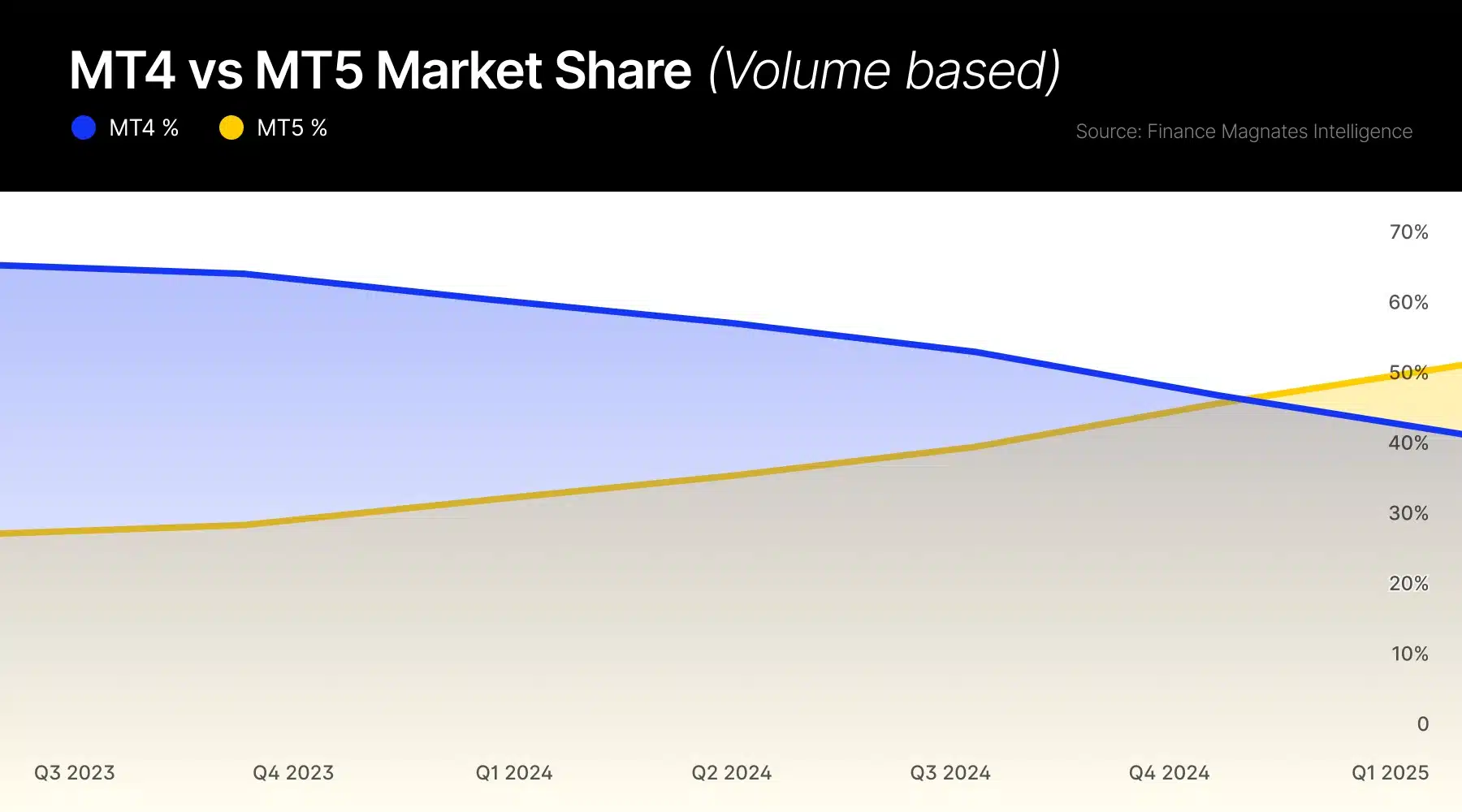
Out of curiosity, MT5 overtook MT4 in trading volume after 15 years:
Bottom line
Interactive Brokers doesn’t support MetaTrader 5. You can connect MT5 to an IBKR account through third-party bridge software, but IBKR doesn’t support it, and it adds cost, latency and risk. If you want to stay with IBKR, its official TradingView integration and TWS API are the closest alternatives.
If MT5 is a must, you’re better off with a broker that supports it natively, such as Pepperstone, FP Markets or IC Markets. Keep in mind that these are CFD brokers, and most retail CFD accounts lose money.
Whether you choose MT4 or MT5 depends on your preferences, but with MT4 in maintenance mode and some brokers already phasing it out, MT5 is the safer choice for anyone starting now.
FAQs
What is Interactive Brokers?
Established in 1978, Interactive Brokers is one of the largest global brokers. It offers trading solutions for traders, investors and advisors, with access to nearly all asset classes, such as stocks, options, futures, currencies, bonds, ETFs and commodities (and you can take advantage of a referral bonus). To know more, read our full Interactive Brokers review.
What is MT5?
MetaTrader 5 is a multi-asset trading platform developed by MetaQuotes Software and released in 2010. It lets you trade forex, CFDs, stocks and futures, depending on what your broker offers. It provides in-depth price analysis tools (21 timeframes and up to 100 charts open at the same time), and you can use trading robots (expert advisors) and copy trading signals to automate your trades.
Can I use TradingView with Interactive Brokers?
Yes. Since May 2022, Interactive Brokers is officially integrated with TradingView. You can connect your IBKR account (live or paper) from TradingView’s trading panel and place orders directly from its charts.