
To withdraw money from Robinhood, open your account menu, go to Transfers and select Withdraw. A standard bank transfer is free, and an instant withdrawal to a debit card or bank account costs 1.75% of the amount, with a minimum of $1 and a maximum of $150.
The part that catches most people is timing. After you sell a stock, the money is not withdrawable right away, because the sale has to settle first.
This guide covers the steps, the fees, how long each method takes, the limits and the reasons why your cash may not be withdrawable yet. The figures come from Robinhood's support page on withdrawals and from the Robinhood Financial fee schedule, checked in November 2026.
How to withdraw money from Robinhood
In the Robinhood app, the steps are:
- Open your account: select Account (the person icon).
- Open the menu: select Menu (the 3 bars).
- Go to transfers: select Transfers and then Withdraw.
- Enter the amount: type how much you want to withdraw.
- Choose the Robinhood account: pick the account the money comes from.
- Choose where the money goes: select the linked bank account or debit card. If the account qualifies for instant transfers, Robinhood shows it next to the account name.
- Review: check the amount and any fee.
- Confirm: select Transfer.
An instant transfer cannot be cancelled once you confirm it. A standard bank transfer that is still pending can sometimes be cancelled.
How much does it cost to withdraw from Robinhood?
Robinhood does not charge for standard bank transfers. You pay only if you want the money faster or by wire.
| Method | Fee | Time |
| Standard bank transfer (ACH) | $0 | 1 day at Robinhood, longer at some banks |
| Instant bank transfer | 1.75% (min. $1, max. $150) | Typically 10 minutes |
| Debit card | 1.75% (min. $1, max. $150) | Instant |
| Wire transfer | $25 | Typically same day before 4 PM ET |
Sources: Robinhood transfer types and Robinhood Financial fee schedule, November 2026.
With the 1.75% fee, an instant withdrawal of $1,000 costs $17.50. The fee stops growing at $150, which is what you pay on an instant withdrawal of $10,000. On small amounts the $1 minimum applies, so an instant withdrawal of $20 costs $1, or 5% of the amount.
How long does a Robinhood withdrawal take?
It depends on the method you choose and on whether the money is already settled:
- Standard bank transfer: Robinhood processes the withdrawal in 1 day, but the money can take longer to show in your bank account. Robinhood itself says the free option can take up to 5 business days to be available.
- Instant bank transfer: typically 10 minutes, sometimes longer depending on your bank. It is only available for selected banks.
- Wire transfer: typically the same day if you submit it before 4 PM ET.
If you sold investments to raise the cash, add the settlement period. Stock and options trades settle on the trade date plus 1 trading day (T+1), and Robinhood makes the proceeds withdrawable on the second day.
Crypto works differently. Proceeds from a crypto sale can be used right away to buy other assets, but withdrawing them to your bank can take up to 5 business days.
Why can't I withdraw my money from Robinhood?
The amount you can withdraw (your withdrawable cash) can be lower than the cash balance you see. These are the reasons Robinhood lists:
- Unsettled sales: money from a sale is not withdrawable until the trade settles.
- Pending deposits: a standard bank deposit can take up to 5 business days to complete, and that money cannot leave before then.
- Pending orders: cash set aside for buy orders that have not executed is not available.
- Daily limits: your withdrawal limit, in amount and in number of transfers, varies by account. For standard transfers it resets each business day at 7 PM ET.
- Referral stock: the value of free stock from Robinhood's referral programme can reduce what you are allowed to withdraw.
Your available balance shows before you submit the transfer, and your own limits are under Transfers, in the transfer limits section.
Robinhood withdrawal limits
Robinhood publishes a maximum for each method. Your own daily limit can be lower.
| Method | Maximum withdrawal |
| Standard bank transfer (ACH) | Up to $250,000 |
| Debit card | Up to $15,000 |
| Wire transfer | From $50,000 to unlimited, depending on the account |
Source: Robinhood transfer types, November 2026.
Withdrawing from Robinhood in the UK
The rules above are for US accounts. Robinhood in the UK has its own limits: a maximum of 5 withdrawal attempts a day and £250,000 per transaction, with withdrawals taking 1 to 2 business days.
UK withdrawals carry a currency conversion fee: 0.1% for withdrawals submitted between Sunday 10 PM and Friday 10 PM GMT, and 0.3% for those made on Fridays between 10 PM and 2 AM GMT.
How to withdraw money from Robinhood in Europe
Robinhood accounts in the European Union are held in euros with Robinhood Europe, UAB, which is licensed by the Bank of Lithuania, and withdrawals go out by SEPA bank transfer. The steps on Robinhood's EU page on bank transfers are:
1. Open your account: tap Account (the person icon) in the bottom menu.
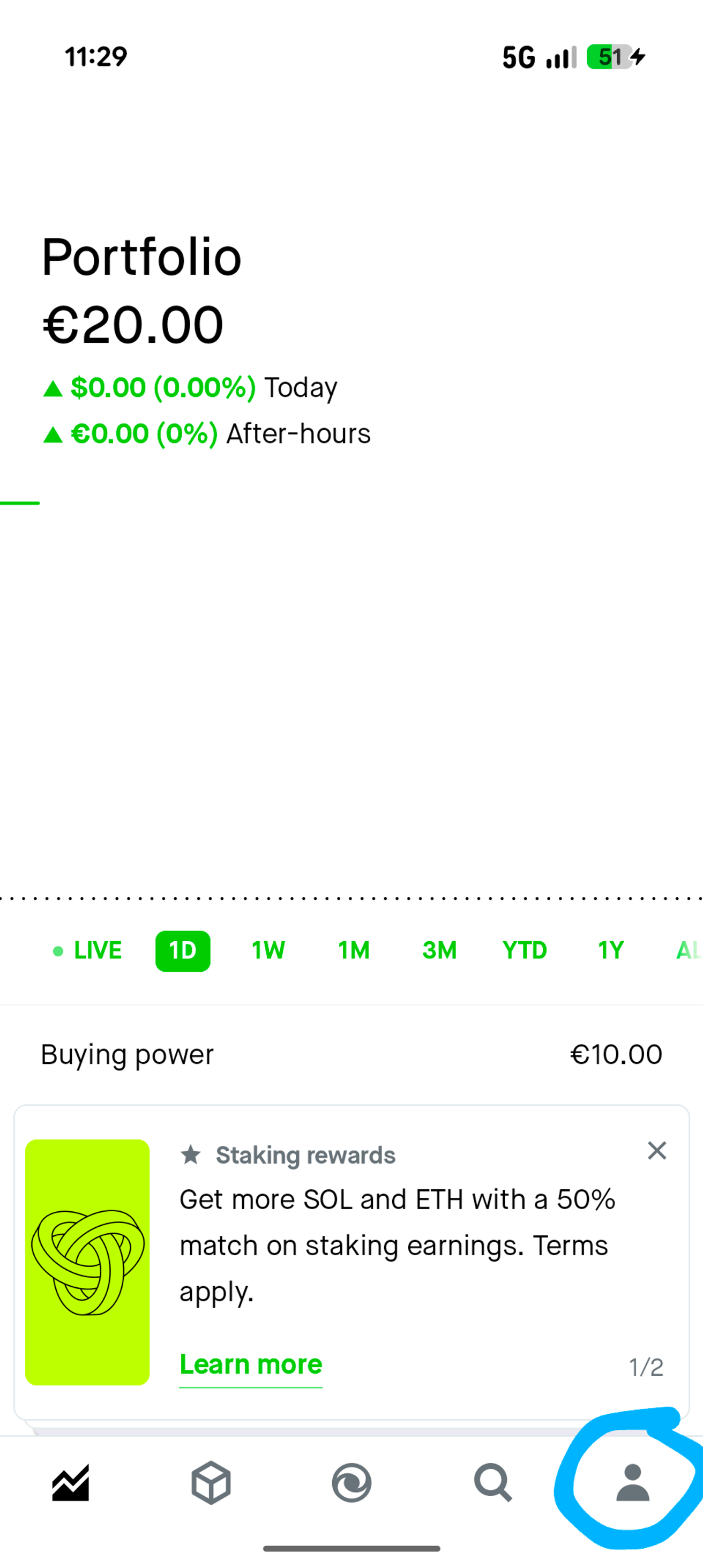
Screenshot from our own Robinhood account in Europe, 22 November 2026.
2. Select Transfer money: it is the first option in the account menu and covers deposits, withdrawals and transfer limits.
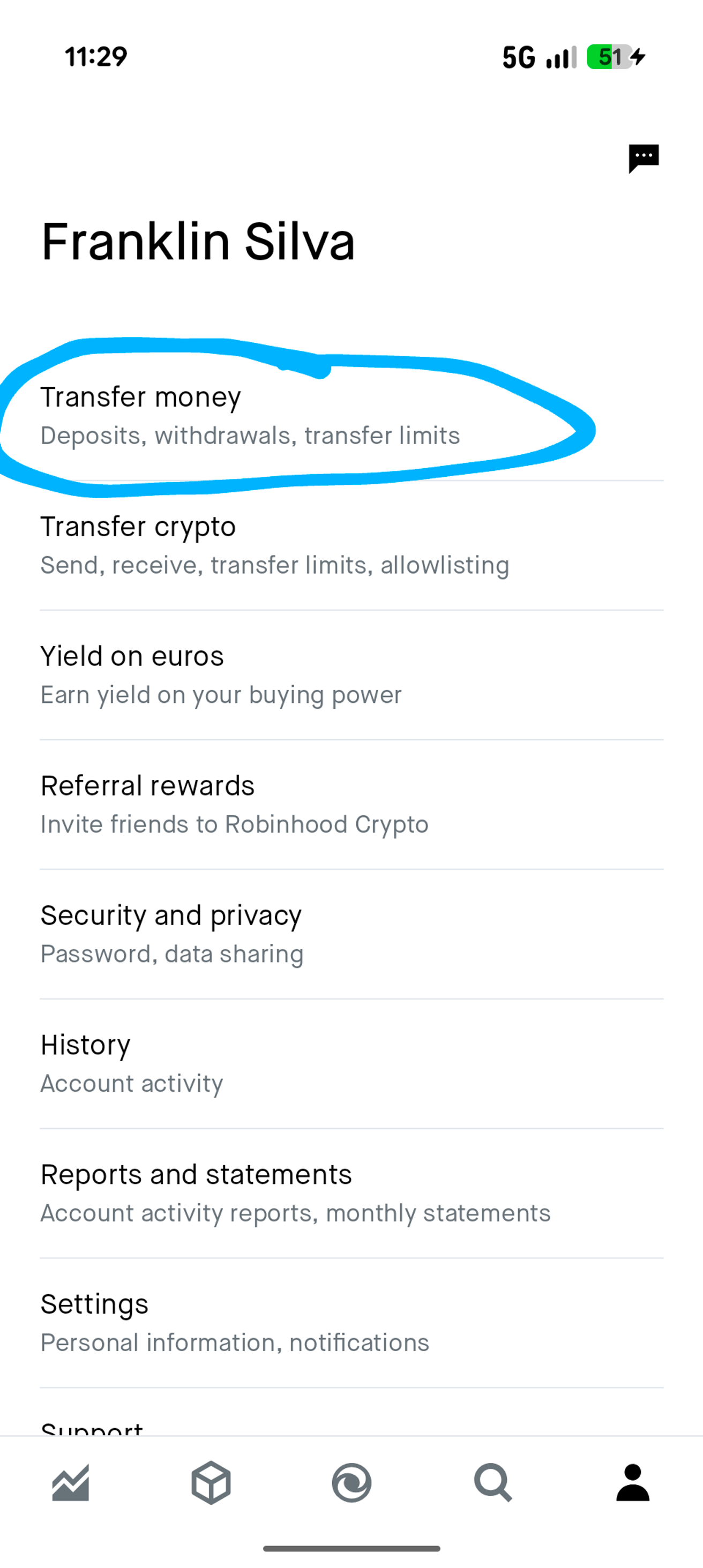
Screenshot from our own Robinhood account in Europe, 22 November 2026.
3. Tap Withdraw: the Transfers screen also shows your transfer limits and the amount available to withdraw.
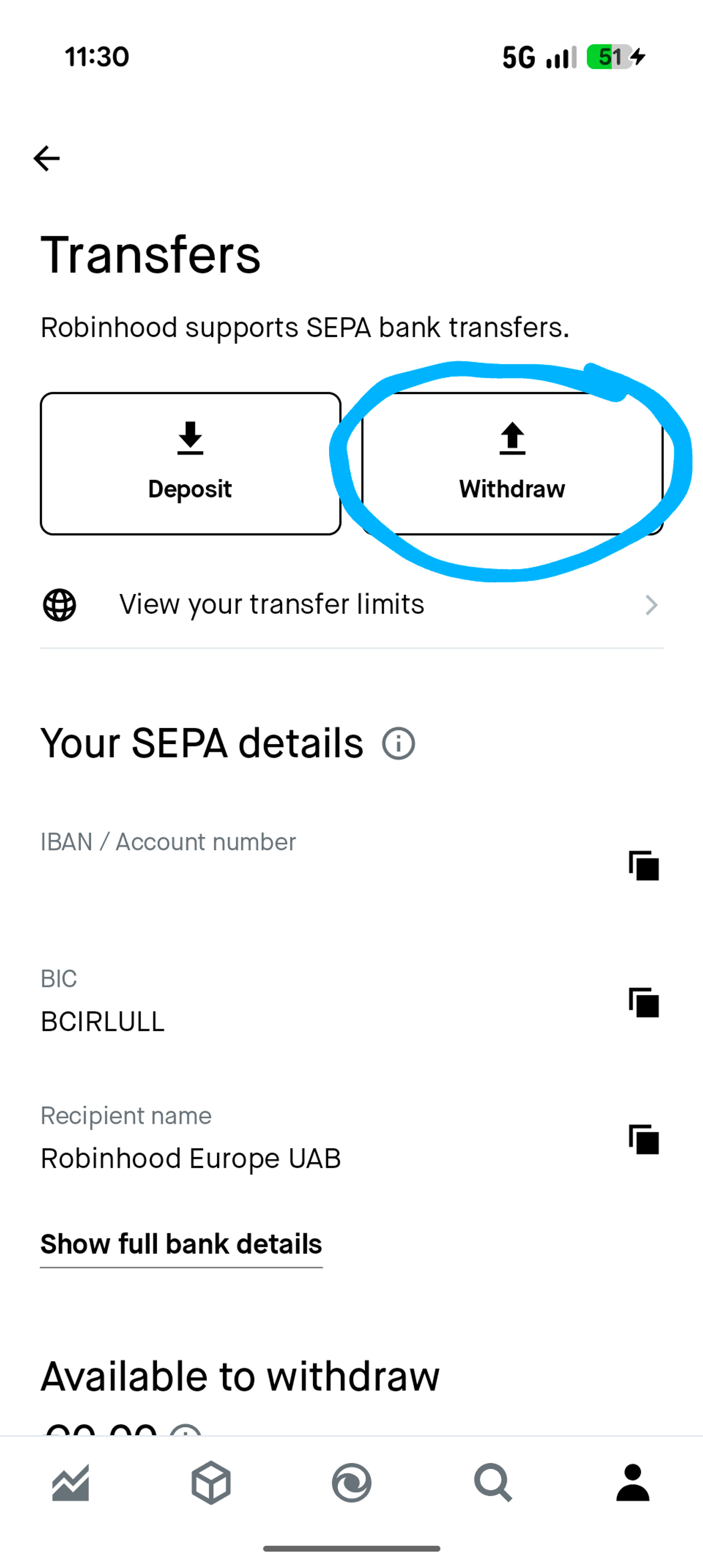
Screenshot from our own Robinhood account in Europe, 22 November 2026.
4. Enter the amount and review: type how much you want to withdraw, select Review and check the amount and the bank account. To send the money to a different saved bank account, select Withdraw to.
5. Confirm: select Withdraw and then Done.
Robinhood asks you to confirm the withdrawal with Face ID or your PIN, or with an SMS code if neither is available.
These rules apply to European accounts:
- Bank account: you can only withdraw to a bank account that you already used for a completed deposit. Robinhood saves it after the deposit and you cannot add one by hand.
- Timing: usually within 2 business days, depending on your bank. If your bank supports SEPA Instant Credit, the money should arrive in seconds.
- Limit: up to €100,000 per business day.
- Stock Tokens: euros from selling Classic Stock Tokens can be used to trade right away, but you can only withdraw them on the next business day after the sale.
Before you sell to withdraw
Withdrawing cash you already hold has no tax effect. Selling investments to raise that cash is different, because a sale can create a taxable gain or loss.
If the goal is to move to another broker, you do not have to sell. An account transfer moves your positions as they are, and the receiving broker usually starts it for you. If you are leaving for good, see how to close a Robinhood account.
Disclaimer: When investing, your capital is at risk and you may get back less than invested. This article is for information only and is not tax or investment advice.
FAQs
Is there a fee to withdraw money from Robinhood?
Not for a standard bank transfer, which is free. Instant withdrawals to a debit card or bank account cost 1.75% of the amount, with a minimum of $1 and a maximum of $150, and an outgoing wire costs $25.
How long does it take to withdraw money from Robinhood?
A standard bank transfer is processed by Robinhood in 1 day and can take up to 5 business days to be available at your bank. An instant bank transfer typically takes 10 minutes, and a wire is typically completed the same day if submitted before 4 PM ET.
Why is my money not withdrawable after selling a stock?
Because the sale has to settle. Stock and options trades settle one trading day after the trade, and Robinhood makes the proceeds withdrawable on the second day.
Can I cancel a Robinhood withdrawal?
You cannot cancel an instant bank transfer or a debit card transfer. A standard bank transfer that is still pending can sometimes be cancelled.
What is the maximum I can withdraw from Robinhood?
Up to $250,000 by standard bank transfer and up to $15,000 to a debit card, according to Robinhood. Your own daily limit depends on your account and shows in the app before you submit the transfer.